While we don’t often see files larger than 5MB, we request that you zip your files to reduce their size.
To upload files that are larger than 5MB, follow these steps:
1. Locate the file or folder that you want to zip
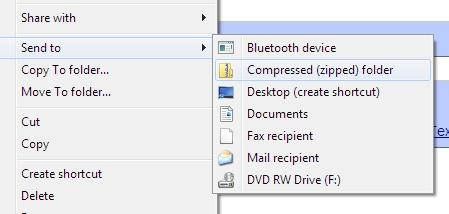
2. On Windows, press and hold (or right-click) the file or folder, select Send to, and then select Compressed (zipped) folder.
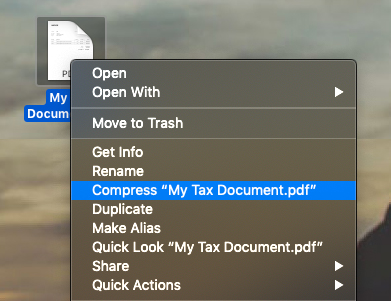
On Mac, press and hold (or right-click) the file or folder, select Compress.
3. A new zipped folder with the same name is created in the same location. To rename it, press and hold (or right-click) the folder, select Rename, and then type the new name.
4. Once zipped, please re-upload the files directly within the files section.
To access files, simply log into your Greenback Tax Companion and navigate to your FILES section

If you have any questions or need any support at all, you are welcome to reach out to help@greenbacktaxservices.com or start a chat on our website!